
How to Create Promotional Graphics for a Release in ORB | Help Center
Generate Promo Canvas teasers, Instagram posts, or Instagram Stories from an approved release, then preview, download, or share them.
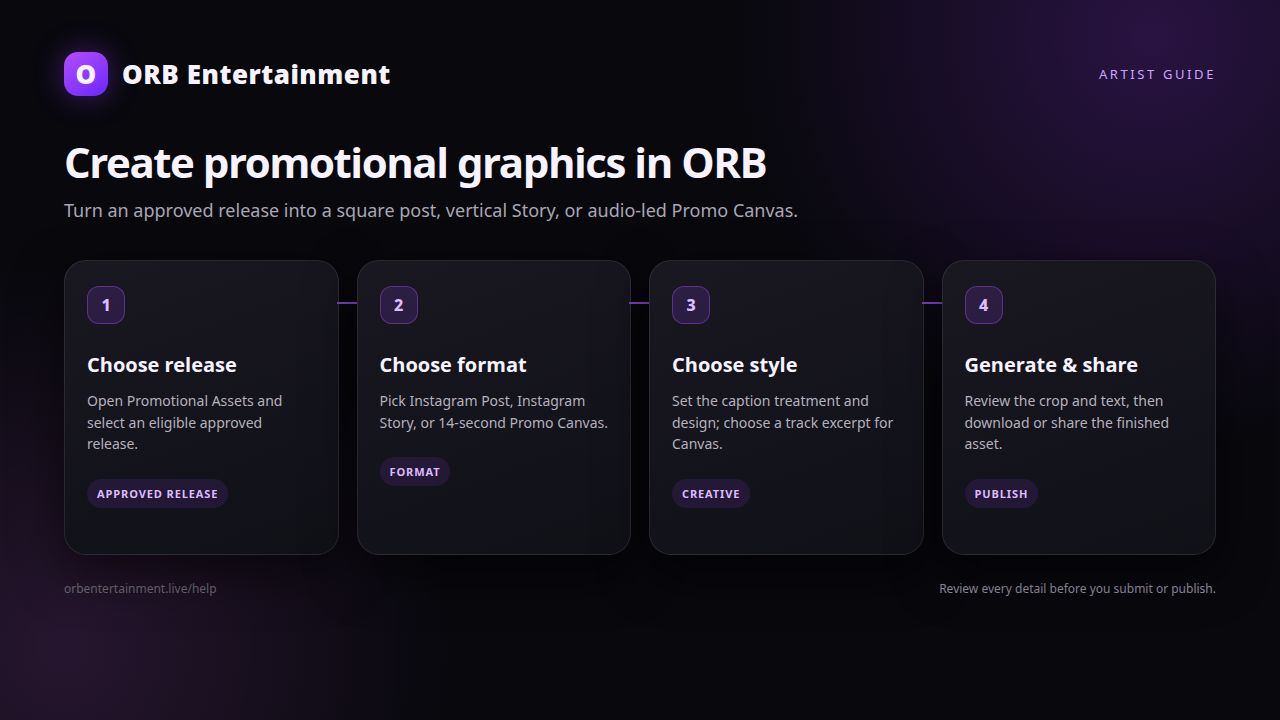
ORB Promotional Assets turns approved release artwork into ready-to-share social content. You can create a square Instagram Post, a vertical Instagram Story, or a 14-second vertical Promo Canvas with a track excerpt.
Before you start
Open Portal → Promotional Assets and make sure the release is Approved and has cover art. Free-release access is limited to ORB's release window policy; a release outside its 30-day window may require an activated plan. For a Promo Canvas, the release must also have a playable track. Choose a track excerpt you have rights to use and keep your artist and release metadata accurate.
Step 1: Open Promotional Assets
Choose Generate Graphics. Select an approved release from the grid. If the release is not listed, it is not currently eligible—check its approval status, cover art, and release access window.
Step 2: Choose an asset type
Select one of the available formats:
- Promo Canvas — a 14-second vertical teaser using a track excerpt.
- Instagram Post — a 1:1 square image for a feed.
- Instagram Story — a 9:16 vertical image for Stories.
Step 3: Choose caption and style
Choose the caption/status treatment (or leave it on Auto) and select a designer style. For Promo Canvas, select a track and set the audio start time; preview the excerpt before generating. Make sure the crop keeps important artwork details visible in the chosen ratio.
Step 4: Generate and review
Select Generate. ORB renders the asset from the release cover and metadata, saves it to Promotional Assets, and shows a success message when it is ready. Open the preview and check the artist name, release title, crop, caption, and (for Canvas) audio excerpt before publishing.
Step 5: Download or share
Use the asset card's Download button to save a PNG or video file. On supported phones, Share opens the native share sheet; otherwise ORB downloads the file so you can post it from your gallery. Search assets by release title or filter by Promo Canvas, Instagram Post, or Instagram Story.
Rights and safety notes
Only use cover art, audio, artist names, photos, and logos you own or have permission to use. ORB generates content from your release; it does not clear third-party rights. Do not imply endorsement by Spotify, Instagram, or another platform, and review generated text for accuracy before posting. Follow each social platform's current format, music, advertising, and community rules.
Troubleshooting
- No approved releases appear: wait until ORB approves the release and confirm it has cover art.
- Canvas cannot be generated: select a track with an available audio file and choose a valid excerpt.
- Graphics are locked: check the Free release's 30-day access window or activate an eligible plan.
- Generation failed: verify cover art is present, retry, and use a supported release format.
- Share did not open: download the asset instead; browser and device support for file sharing varies.
- The crop hides important art: choose a style with safer composition or adjust the source artwork before generating again.
Which promotional graphic formats can I create in ORB?
You can create a 14-second vertical Promo Canvas, a square Instagram Post, or a 9:16 Instagram Story from an eligible approved release. Promo Canvas additionally requires a track excerpt.
When can I create promotional graphics for a release?
Graphics become available once a release is Approved and has cover art. Never-paid Free artists can use the feature during the applicable 30-day release window; after that window, activate a plan to restore access.